


Time Warp Scan - Face Scan
4.51.32K Reviews
App Specs
- Version
- 3.7.0
- Updated On
- License
- Free
- Downloads
- 10,000,000+
- Developer
- Photo Collage & Grid - Foto Grid
- Categories
- Photography
- Platform
- Android, iOS
Screenshots
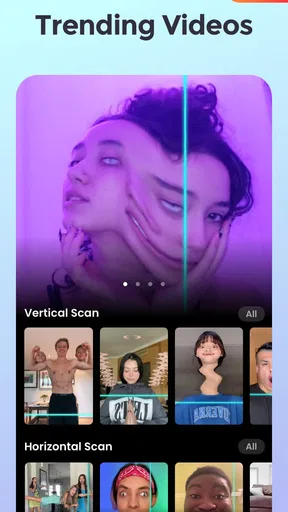
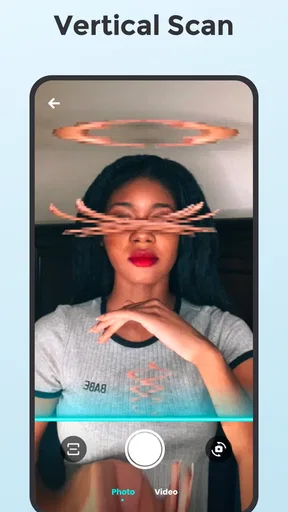
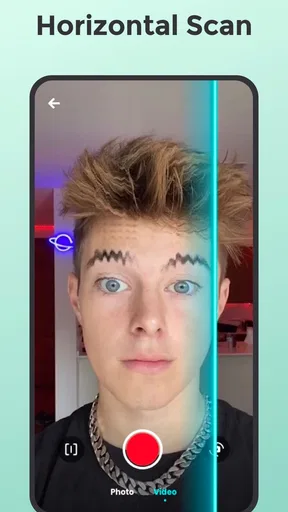

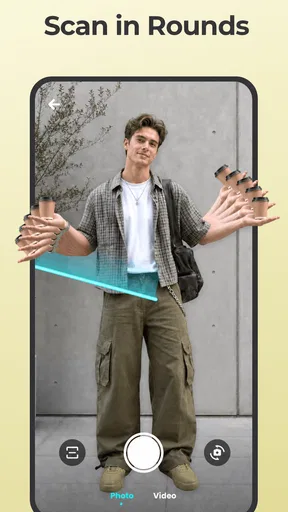
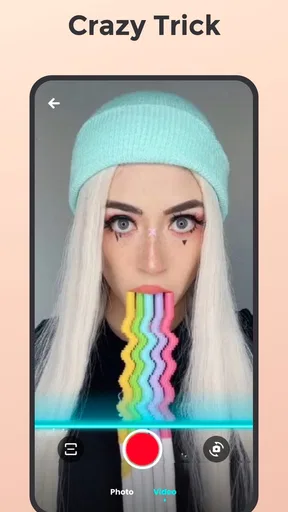
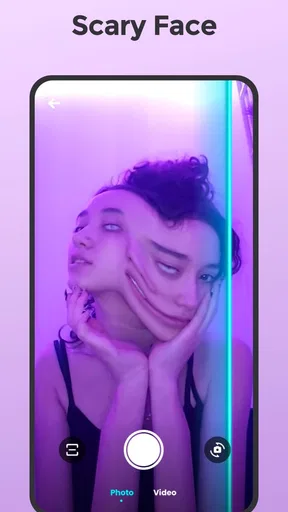
 Analysis by AppCompare
I often reach for a playful camera effect when a regular selfie feels too predictable, and Time Warp Scan - Face Scan is built around that kind of quick experiment. It turns a simple pose into a stretched, skewed image or clip, so the fun is less about polishing a portrait and more about seeing what happens when you move at the right moment. I’d recommend it to friends who enjoy making silly social posts, but I wouldn’t treat it as an all-purpose photo editor.
What the scan effect is good at
The central idea is a moving scan line that records different parts of the frame at different moments. That timing is what creates the warped look: hold still and one area may stay recognizable, while moving your head, hand, or an object can make another area appear elongated or bent. The result is intentionally unpredictable, which makes trying several takes more entertaining than expecting a perfect first shot.
For a simple everyday example, I might set the phone somewhere stable before meeting friends, start a scan, and have everyone change their expression as the line passes. A slow hand wave or turning your face gradually can make the distortion easier to read; sudden movement can produce a more chaotic surprise. If you want a result that looks deliberate rather than random, it helps to decide on one action before recording and repeat it with a slightly different pose.
Speed is part of the creative control
The scanning-line speed matters because it changes how much time separates the captured parts of the image. A slower pass gives you more room to coordinate a pose or movement, while a quicker pass can make the distortion feel sharper and more abrupt. I’d start with a small, controlled movement rather than trying to do several things at once; that makes it easier to see which timing produced the effect you wanted.
This is not the same kind of speed as a conventional camera app’s quick shutter. The effect depends on the scan progressing across the scene, so the process asks you to wait for the pass and then judge the result. If your first take looks odd in the wrong way, that isn’t necessarily a failure: change just one variable, such as the direction of movement or your pose, and try again. That simple workflow is more useful than repeatedly recording without a plan.
Making a clip without overcomplicating it
Video mode is useful when the joke depends on a visible change over time rather than a single frozen image. I’d keep a clip focused on one person or one moving prop at first, because several simultaneous actions can make it difficult to tell what caused the distortion. A friend can also operate the phone while you perform, which is a practical option when a steady setup matters more than holding the camera yourself.
There is a trade-off here: the same oddness that makes the effect amusing can make a result hard to control. A carefully posed portrait is better handled by a standard camera or an editor with more precise retouching tools. This app is the better choice when the goal is an amusing visual experiment, not a natural-looking selfie, a polished collage, or detailed image correction.
Worth Reading Before You Choose

Baby Panda World Brings Quick Play to Modern Phones, but Its Game Library Feels Busy

ESPN’s Live Game View Makes Following Close Games Easier

QuizzLand Review: A Good Fit for Short Trivia Breaks, Not Every Player

Basketball Stars: Multiplayer Is Fast, but Can It Recover When Matches Go Wrong?

WEBTOON Turns Phone Updates Into a Better Reading Routine

Link to Windows Runs on Shared Habits, Not Social Feeds
Unleashing Creativity with Time Warp Scan
First off, let’s talk about the app’s main feature. The Time Warp Scan - Face Scan uses a simple but innovative horizontal or vertical scanning line that freezes the frame as it moves. This creates a still image that captures your face or any object in a warped, distorted, or stretched appearance. Whether you want to give yourself a long beard, a wide smile, or just create an abstract art piece, the possibilities are endless.
How It Works
Once you open the app, you'll be met with an intuitive interface that’s super easy to navigate. Just select whether you want the scan line to move horizontally or vertically, hit the start button, and let your creativity run wild. You can strike a pose, wave, or even bring in some props to spice things up. The app captures your movements and the final image is a delightful surprise that you’ll want to share with everyone.
Features That Stand Out
One of my favorite features is the ability to adjust the speed of the scanning line. This gives you more control over the final result, allowing for even more creative freedom. Plus, the app doesn’t just stop at taking photos. You can switch to video mode and create hilarious clips that will have your friends and followers in stitches. The app also offers some basic editing tools, allowing you to crop or enhance your images before sharing.
Sharing the Laughs
Once you’ve created your masterpiece, sharing it is a breeze. The app integrates seamlessly with social media platforms, so whether you're an Instagram aficionado or a TikTok enthusiast, you can easily post your creations for the world to see. The app’s popularity is growing, and it’s no wonder why. It’s a great way to engage with friends, challenge each other to create the funniest face, or even start a new viral trend.
Who will enjoy it, and who may not
As a photography app, it has a narrow, clear purpose: add a playful scan distortion to a face or object. The app is made by Photo Collage & Grid - Foto Grid, and its store summary points to humorous time-warp effects rather than conventional camera editing. That focus suits casual creators, group chats, and anyone who likes turning a short break into a quick visual challenge. It is less suited to someone who mainly wants reliable portraits, extensive retouching, or a full set of photo-management tools.
A useful trick is to keep the background simple when you want the face to remain the subject. Busy movement behind you can compete with the scan effect, while a plain wall or uncluttered corner makes the distortion easier to understand. For a prop-based gag, choose an object with a recognizable outline and move it gradually; that gives the scan a clearer shape to stretch than a fast, complicated gesture. These small choices can make a bigger difference than adding more actions to the scene.
What repeated use feels like
For a few playful takes, the workflow is straightforward. During heavier use—trying multiple poses, switching between stills and clips, or repeating a group challenge—the main cost is your time and attention: each attempt needs a setup and a moment to inspect. I wouldn’t assume that every unusual result means the app has failed; the effect is designed to record motion in an unconventional way. If a take seems confusing, simplify the movement and retry rather than piling on edits.
As with any camera effect, the phone and the scene can influence how comfortable the process feels. A steady surface or a friend holding the device can help when you need both hands for a pose. If the preview or capture feels sluggish on your device, close other demanding apps and try a simpler scene before deciding whether the effect itself is the issue. Those are practical steps, not a promise that every phone will behave identically.
How it fits beside familiar photo apps
Compared with a standard camera, this app prioritizes a distinctive distortion over natural color, sharp portrait detail, or flexible framing. Compared with a general editor, it is more immediately playful but less appropriate for careful retouching and final presentation. I’d use it to create the odd image or clip, then move to a familiar editor only if I wanted to crop or prepare the result for a particular post. That division of labor keeps expectations sensible.
Its audience scale is substantial: it has passed ten million installs and holds an average rating of 4.3 from around thirty-four thousand ratings, with about 1.3 thousand written reviews. Those figures suggest many people have tried it, but they don’t guarantee that every device or creative style will suit the effect. The app is free to install and rated for Everyone; optional in-app purchases range from $2.49 to $38.99 per item, so I’d check any purchase screen carefully before confirming anything.
Practical expectations and device fit
The app was released on July 8, 2022, and its current version is 2.9.0, with Android 8.0 listed as the minimum operating system. I’d treat that requirement as a compatibility starting point rather than a promise of identical performance across phones. A device that meets the minimum may still feel different from a newer one, especially when you are capturing repeated clips, so a short test in good light is a sensible first step.
If you’re wondering whether it is better for photos or videos, I’d choose according to the gag: a still works when the distorted pose is the punchline, while a clip helps when the movement itself is funny. If you want to post the result, use the app’s sharing workflow or save and prepare it elsewhere according to your preference. For clean portraits, precise editing, or dependable results on the first attempt, I’d choose a conventional camera or a broader editing app instead.
My performance verdict
Time Warp Scan - Face Scan is most convincing when I treat it as a focused creative toy rather than a daily camera replacement. Its speed adjustment, horizontal and vertical scan directions, still capture, and video mode give me several ways to shape a joke, but the effect still depends on timing and movement. That means a little patience is part of the experience, particularly when I’m trying to get a group shot or a very specific distortion.
The app was released on July 8, 2022, and its current version is 2.9.0, with Android 8.0 listed as the minimum operating system. I’d treat that requirement as a compatibility starting point rather than a promise of identical performance across phones. A device that meets the minimum may still feel different from a newer one, especially when you are capturing repeated clips, so a short test in good light is a sensible first step.
It is free to install, although optional in-app purchases are available, and the Everyone age rating makes it approachable for a broad audience. I’d recommend trying it if you enjoy sharing playful effects and don’t mind a few experimental takes. If you need a polished portrait tool or a more controlled editing workflow, it’s not the right fit; for quick, intentionally warped selfies and clips, it offers a distinct kind of fun.
Pros
- Fun and engaging filters for selfies.
- Easy to use interface.
- Variety of effects to choose from.
- Low storage requirement.
- Quick sharing options for social media.
Cons
- Contains in-app ads.
- Limited features in free version.
- Requires camera permissions.
- Occasional app crashes.
- No offline mode available.
FAQs for Time Warp Scan - Face Scan
What is Time Warp Scan - Face Scan and how does it work?
Time Warp Scan - Face Scan is a creative app that utilizes a unique filter to stretch or warp images in real time. By using a horizontal or vertical line that moves across the screen, users can create amusing and artistic effects on their selfies or videos. It captures the image as the line passes, allowing you to manipulate the outcome by moving or adjusting your face or objects.
Is Time Warp Scan - Face Scan available for both Android and iOS devices?
Yes, Time Warp Scan - Face Scan is available for download on both Android and iOS platforms. You can find it in the Google Play Store for Android devices and the Apple App Store for iOS devices. Ensure your device meets the app's compatibility requirements for optimal performance.
Are there any in-app purchases or ads in Time Warp Scan - Face Scan?
Time Warp Scan - Face Scan is free to download, but it may include in-app purchases and ads. These purchases typically unlock additional features or remove ads for a more seamless experience. Users can choose to enjoy the basic functionality without spending money or enhance their experience by purchasing optional upgrades.
Is Time Warp Scan - Face Scan safe for children to use?
Time Warp Scan - Face Scan is generally safe for users of all ages, but parental guidance is recommended for younger children. The app encourages creativity and fun, but it may include ads or in-app purchases. Parents should ensure that appropriate settings are enabled to prevent unauthorized purchases and exposure to ads.
What are the main features of Time Warp Scan - Face Scan?
The main features of Time Warp Scan - Face Scan include the ability to create unique photo and video effects using a moving line filter, options for vertical or horizontal scans, and sharing capabilities to showcase your creations on social media. The app also offers customization options and potential in-app purchases for additional features.


